
The meta description tag is the snippet of text you see under the link text after you perform a search on Google. Not in the Google ads, but in the organic results. It briefly explains a bit about the content on that page you are about to click to. Sometimes Google will use snippets of that pages body text to make a description based upon your query. The meta description tag is not visible to a visitor who is on your website as it is embedded in the HTML code.
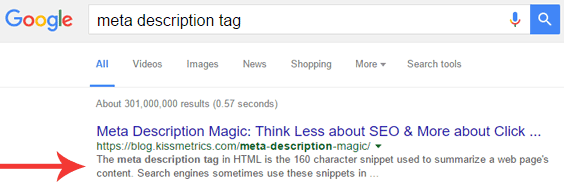
There are some differing opinions on the value of the description tag. We have found this tag to be extremely important in enticing a click. Below are our observations on how to best implement the meta description tag.
Meta Description Tag Guidelines
Length
There is only so much space on Googles results pages to display the description tag before it truncates. This limit is right around 160 characters. We recommend a description tag between 150 and 160 characters. Anything less will waste valuable space to attract a click and a longer description will be truncated.
Proper Format of the Description Tag
Without the quotes.
“<meta name=”description” content=”This is an example of a meta description tag. This will often show up in search results or snippets of your pages body text will be auto generated by Google.”>”
Where to Place the Description Tag
The description tag needs to reside in between the HEAD tags of all your important pages. Most website platforms such as WordPress, SquareSpace, Shopify, Magento, etc., have an interface to simply type in your descriptions without any coding required.
What Pages Should have a Description Tag?
All your websites pages should have a description tag. This does not mean copying the meta description tag from your home page and using it on all pages. Every page needs to have a unique description tag. Always keep in mind that you are trying to entice a click on Google via the description tag. Don’t be vague. Write a description of exactly what the visitor will find when they click through to that page.
Effective Wording for the Description Tag
To best utilize the 160 character limit for the description tag, you want to briefly explain what that web page is offering and explain a bit about yourself or your company. 160 characters is perfect for two brief sentences. One of those sentences should explain your company, the other sentence should explain that web pages content. We have experimented with which sentence should be first. Logically, one would think that the first sentence should contain information about that web pages content. However, when we have the first sentence explaining the company, there was little or no measurable difference in clicks.
You should also use the phrase you are targeting in the title tag. See our blog on How to a Optimize your Title Tags. This way, when you come up for a search on Google, those words in the description tag will be bolded to attract the searchers attention.
In Summary
Spending time creating unique description tags for each page will be well worth it as your website will generate more qualified visitors. When creating these tags, keep it simple by writing two sentences, one about your company, and one about that web pages content.
How to Properly Use the Meta Description Tag:
- Keep it Between 150 and 160 Characters
- Create a Unique Description Tag for Each Page
- Place in Between the HEAD tags of Each Page
- Have One Sentence Describing the Page and Another Sentence Describing Your Business